- Insight
- # Dior Accessory QC: Spreadsheet or Sheets?  Caption: This article uses public page screenshots from the fashion-reps product catalog to help readers understand the relationship between product pages, QC photo entries, and record sheets. ## Clarifying the Dior Accessory QC Photo Check Task If you are
Editor score 4.2 / 5

Caption: This article uses public page screenshots from the fashion-reps product catalog to help readers understand the relationship between product pages, QC photo entries, and record sheets.
Clarifying the Dior Accessory QC Photo Check Task
If you are preparing to purchase Dior-style bags or other accessories through a shopping agent, the real problem you need to solve is not "which spreadsheet is more advanced", but whether you can match the product information, QC photos, and pending questions for the same item.
After reading this article, you should be able to accomplish three things:
- Locate product pages and QC photo entries in fashion-reps' website-type product catalog.
- Use Google Sheets to record style, material, specifications, photo status, and pending questions.
- Before ordering, distinguish facts already shown on the page, images that need to be requested from the agent, and judgments that have not yet been confirmed.
This article does not apply to situations where you already have a complete order number, warehouse photos, or need to handle after-sales disputes. Those tasks should be based on the agent's backend, order records, and actual QC files.
What Page Information Can Be Seen in fashion-reps Website Spreadsheet
fashion-reps' product catalog presents products on website pages. Publicly visible pages usually place brand categories, product titles, reference prices, specifications, purchase agent entries, and QC photo entries on the same page. Users can first discover products through browsing, searching, or brand categories, then enter specific product pages to view information.
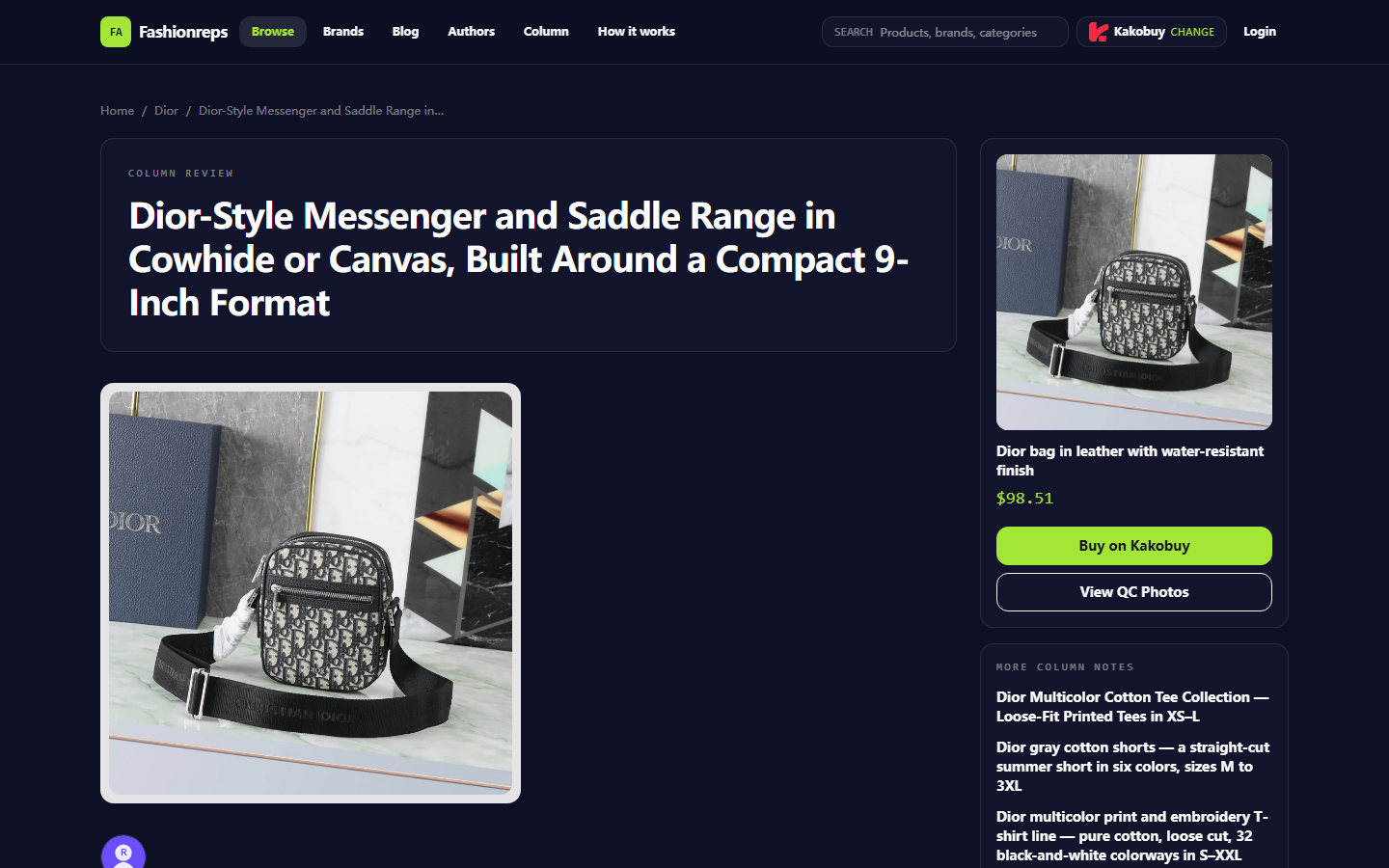
Taking the currently visible Dior-style crossbody bag page as an example, the page displays the following content:
- Product title and Dior category.
- Reference price of 98.51 USD.
- Page specifications such as 9-inch device capacity.
- Page descriptions like leather or canvas.
- Purchase agent selection entry.
- "View QC Photos" entry.
- Purchase tips on pattern alignment, canvas texture, and load-bearing performance.
This content is suitable for initial screening, but the reference price on the page does not equal the final payment amount. The page already states that product price, service fees, and international shipping costs need to be confirmed on the shopping agent's website. Taxes, route restrictions, and destination country customs requirements cannot be directly inferred from the product catalog page.
Therefore, the website page is more suitable for answering "what is this product, what visible specifications does it have, and where to go next", rather than replacing warehouse QC photos or agent order pages.
How Google Sheets Records Photos, Specifications, and Pending Questions
Google Sheets is more suitable for building a filterable, supplementable, and collaborative check list after you have already found several candidate products. It does not discover products for you, nor does it automatically prove that the details in the photos are qualified.
It is recommended that each row corresponds to only one product or one specific style; do not mix multiple colors, sizes, and materials in the same cell. The following fields can be used:
- Product title
- Product page identification
- Material or version
- Page specifications
- Reference price and currency
- Whether QC photos are visible
- Areas of the photo that need to be checked
- Page facts
- Editorial judgment
- Questions to confirm with the agent
- Last verification date
- Decision: continue, request more photos, or pause
For example, for the Dior-style canvas version mentioned on the page, you can list "whether the pattern is aligned at the seams", "whether the canvas texture is clear", and "whether there are obvious signs of sagging at the bottom of the bag" as pending questions. Do not record conclusions like "looks authentic" or "good quality" as unverified.
The value of the table record lies in preserving the judgment process: you can see which content comes from the page, which comes from QC photos, and which still requires agent response. 📋
Check Sequence from Product Page to QC Photos
Step 1: Confirm Product Identity First
First record the complete product title, category the page belongs to, material version, and page specifications. The Dior-style crossbody bag page displays different material and capacity descriptions, so you cannot assume they are the same SKU just because the titles are similar.
If the page shows both leather and canvas versions, they should be recorded separately. There are cautious purchase tips on the page regarding the canvas version's wear resistance, softness, and load-bearing performance, but these tips are for the relevant style and cannot be directly extended to all leather versions.
Step 2: Record What the Page Clearly States
Page facts should use neutral language, for example:
- The page lists a reference price of 98.51 USD.
- The page lists 9-inch device capacity.
- The page provides a purchase agent selection entry.
- The page provides a QC photo viewing entry.
- The page requires confirmation of service fees and international shipping costs on the shopping agent's website.
Do not rewrite product descriptions like "waterproof" or "lightweight" as completed performance tests. They can only be recorded as page claims.
Step 3: Open QC Photos and Check Item by Item
After entering QC photos, prioritize checking areas that can be directly observed:
- Overall silhouette of front and back.
- Continuity of Dior-style pattern at edges and seams.
- Obvious abnormalities in canvas texture or leather surface.
- Installation status of metal parts, buckles, and zippers.
- Bottom of the bag, corners, and shoulder strap attachment points.
- Whether the photos are clear enough to judge key details.
If the photos do not cover a certain area, mark it as "missing photo" rather than assuming that area has no problems. If the source, time, or corresponding style of the photo is unclear, pause judgment. 🔍
Step 4: Separate Observation from Judgment
"The photo shows part of the pattern is blocked at the seam" is a visible observation; "pattern misalignment" is a further judgment. The two should be filled in separately so that subsequent supplementary photos can correct the judgment without rewriting the entire row.
Similarly, "the bag body appears soft in the photo" does not prove that it cannot bear weight. The page has discussions about the canvas bag body being soft and possibly sagging when loaded with heavier items, but this is still purchase information for the relevant style and cannot replace actual use testing.
How to Separate Visible Evidence from Editorial Judgment
It is recommended to use two groups of fields in the table:
The first group is evidence fields, including product page text, QC photo status, photo date, missing angles, and page link identification.
The second group is decision fields, including whether more photos are needed, whether to continue price inquiry, whether to change material, and whether to pause purchase.
For example:
- Visible evidence: The product page states a capacity limit of 9 inches.
- Editorial judgment: If you need to fit a work laptop or camera, do not continue purchasing based solely on this specification.
- Next step: Confirm actual internal dimensions, or choose a larger and more structurally stable style.
This writing approach avoids packaging page descriptions as measured results and avoids turning a single opinion in comments into a general conclusion for all products.
Comparison Table of Website and Spreadsheet Viewing Methods
| Check Step | fashion-reps Website Product Catalog | Google Sheets |
|---|---|---|
| Discover products | Browse through brands, categories, search, and product pages | Relies on already collected product records |
| View product information | Centrally view title, specifications, reference price, and purchase entry on the product page | Suitable for horizontally organizing multiple product fields |
| View QC photos | Enter QC photo entry from the product page | Record whether photos exist, which angles are missing, and last verification date |
| Compare candidate styles | Open pages one by one for judgment | Compare by filtering material, capacity, photo status, and pending questions |
| Collaboration | Suitable for reading and continuing to visit product pages | Suitable for multiple people to supplement records and mark processing status |
| Main limitations | Cannot replace real QC files from agent warehouse, nor represent final costs | Does not automatically verify product authenticity, photo clarity, or page facts |
This means the two are not simple substitutes. The website provides product discovery and page evidence, while Google Sheets organizes the check process for multiple candidate products. 🧭
How to Mark Missing Photos, Broken Links, and Update Times
The most error-prone part of QC checking is mistaking "not seen yet" for "confirmed no problem". It is recommended to use clear statuses:
- Pending review: Product page or QC photos have not been opened yet.
- Reviewed: Page and available photos have been checked.
- Missing photo: Missing angles needed to judge key details.
- Broken link: Page cannot be accessed normally or product information is empty.
- Agent confirmation needed: Page information is insufficient to complete judgment.
- Paused: Insufficient evidence, unsuitable specifications, or unacceptable risk.
Record the date after each re-check. Prices, inventory, purchase agents, service fees, shipping costs, and link status may change, so do not treat old tables as current conclusions. The verification date for the page information cited in this article is September 26, 2026; before repurchasing, you should re-check the corresponding page and agent website.
If the product page still exists but the QC photo entry is unusable, do not use photos from other styles as substitutes. Photos must correspond to the current product or current style, otherwise the table looks complete but cannot support the purchase decision.
Decision to Request More Photos or Pause After Completing Records
After completing a round of records, you can decide the next step based on the following logic:
- Product identity is clear, specifications meet needs, QC photos cover key areas: Continue to confirm final price and availability with the agent.
- Product identity is clear, but clear photos of pattern, material, corners, or bottom are missing: Request more photos from the agent.
- Product capacity clearly does not meet needs: Pause; do not continue just because the reference price is low.
- Page link is broken, photos do not match the style, or key facts are outdated: Pause and wait for new verifiable evidence.
- Need to carry heavy items, but only soft canvas version is available without sufficient structural evidence: Prioritize re-comparing more suitable versions.
The best combination of website spreadsheet and Google Sheets is to first use the website for discovery and initial reading, then use the table to save evidence, gaps, and decisions. This does not automatically improve product quality, nor does it confirm customs clearance, taxes, or after-sales policies for you, but it reduces the risk of missing photos, mixing up styles, and repeatedly asking questions. ✅
For first-time users of shopping agents, the safest approach is to first confirm the service fees, international shipping costs, QC service scope, return and exchange conditions, and destination country requirements on the agent's page, then decide whether to place an order. Do not publicly share order numbers, passports, payment cards, or complete shipping labels; if sharing screenshots, cover personal information first.
Common Questions about agent Platform Shopping
1. What should first-time users of yupoo.tips keep in mind?
New users accessing the Taobao agent through the spreadsheet on yupoo.tips for the first time typically get a welcome shipping discount package. Also, be sure to look at the step-by-step buying tutorial designed for beginners.
2. Why not use Google Sheets on yupoo.tips?
Google Sheets works fine only when a spreadsheet contains few product listings. As the number grows, it becomes very sluggish and laggy. Mobile users, in particular, face a poor layout and find product searches extremely difficult. By contrast, yupoo.tips's built-in spreadsheet loads faster and presents the same products more clearly.
3. What kinds of products are available on yupoo.tips?
yupoo.tips carries a wide variety of categories, such as footwear, tees, sweaters, hoodies, jeans, joggers, shorts, swim trunks, factory overstock, puffer jackets, baseball jerseys, button-ups, caps, accessories, handbags, gadgets, sunglasses, socks, underwear, and popular collectible items.
4. How can I evaluate product quality on yupoo.tips?
To judge quality, inspect the QC photos rather than factory images, which are often edited. Use the QC photos to verify that the item matches your specific detail requirements before you proceed with a purchase. Additionally, steer clear of products priced unusually low, as they generally indicate poor quality.